Is a 4K Webcam Worth It?
When you're hopping on video calls or streaming, seeing yourself and others clearly can make a huge difference. But is stepping up to a 4K webcam really worth the extra investment and hassle? Our research suggests it depends heavily on how you use your camera and what you expect from it.
Most people don't need true 4K for casual chats. However, for creators or professionals who rely on high-fidelity video, the jump from 1080p to 3840 x 2160 pixels can be significant. It's a decision that hinges on your specific needs, your existing tech setup, and your budget.
The Core Question: 4K Webcam vs. Everything Else
The main reason you're asking if a 4K webcam is worth it is that you're wondering if the upgrade delivers a tangible benefit over what you have now. In many situations, a 1080p webcam offers perfectly acceptable video quality for daily tasks like remote meetings. However, for more demanding applications, the leap to 4K can offer a noticeable improvement in clarity and detail.
What Does "4K" Even Mean for a Webcam?
When we talk about a 4K webcam, we're primarily referring to its resolution. This means the camera captures video at a resolution of 3840 pixels horizontally by 2160 pixels vertically. For perspective, that's about four times the number of pixels you get with a standard 1080p (Full HD) webcam.
Manufacturer specifications, like those found on Logitech's official product pages, consistently highlight this pixel count as the defining characteristic of 4K capture.
Why Are We Talking About Webcam Resolution Now?
Webcam technology has advanced rapidly. What was once a blurry, pixelated window into another room is now capable of producing remarkably clear images. As internet speeds have increased and more people work and socialize remotely, the demand for better video quality has grown.
The push for higher resolutions, like 4K, is a natural progression driven by both technological capability and user expectations for a more lifelike virtual presence.
Key Features That Make 4K Webcams Stand Out
Beyond just the resolution number, several other technical aspects contribute to what makes a 4K webcam perform differently, and often better, than its lower-resolution counterparts. These are the parts you'll want to look at when comparing models.
Resolution and Detail: Seeing the Difference
The most obvious difference is the sheer amount of detail a 4K webcam can capture. With 3840 x 2160 pixels, you get a much sharper image compared to the 1920 x 1080 pixels of a 1080p webcam. This translates to finer textures, clearer text in the background, and a more defined appearance of faces.
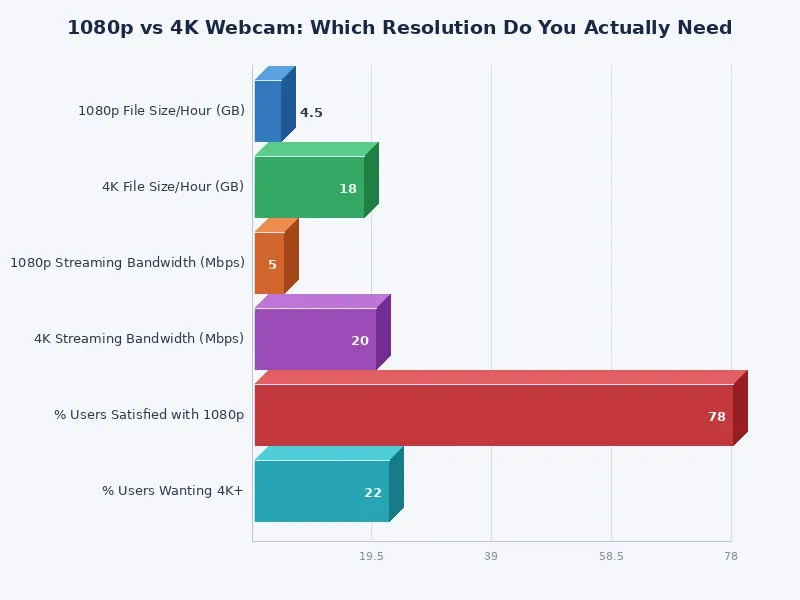
Image source: Bing (Web (fair-use with source credit))
Aggregate reviews often point out that this difference is most apparent on larger displays or when you need to examine fine details in a frame, such as text on a whiteboard or the nuances of a product you're showcasing. For example, if you're demonstrating a small electronic component or pointing to intricate diagrams, the extra resolution makes those details legible.
Frame Rate and Smoothness: Beyond Basic Video
Resolution isn't the only factor in video quality; frame rate matters too. While many 4K webcams are advertised at 30 frames per second (fps), some higher-end models can push 60fps. This higher frame rate results in smoother motion, making your movements look more natural and less choppy, especially during fast-paced interactions or when you're panning the camera.
A webcam that captures 60fps at 4K resolution provides a significantly smoother viewing experience than one stuck at 30fps, even if both are technically 4K. For applications like live streaming or high-action gaming, this smoothness is crucial for viewer engagement.
Autofocus, Low Light, and Image Quality Settings
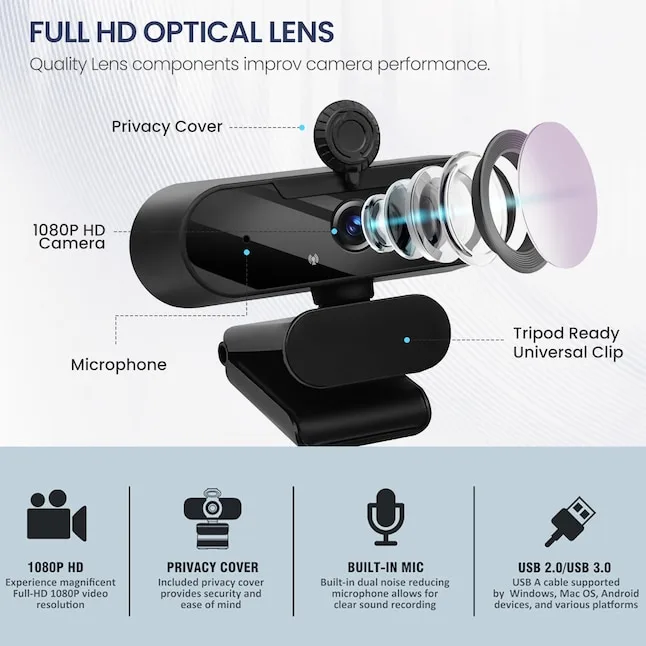
Modern 4K webcams often come equipped with advanced autofocus systems that can track your face and adjust focus quickly and accurately, even in challenging lighting. Many also incorporate High Dynamic Range (HDR) technology. HDR helps balance bright and dark areas in the frame, so you don't appear silhouetted if you're in front of a bright window, or if your room has harsh shadows.
Good low-light performance is another key attribute. While no webcam is perfect in near darkness, better sensors and image processing in 4K models can produce a cleaner image with less noise (graininess) when the lights are dim. This means you don't always need perfect studio lighting to get a decent-looking shot.
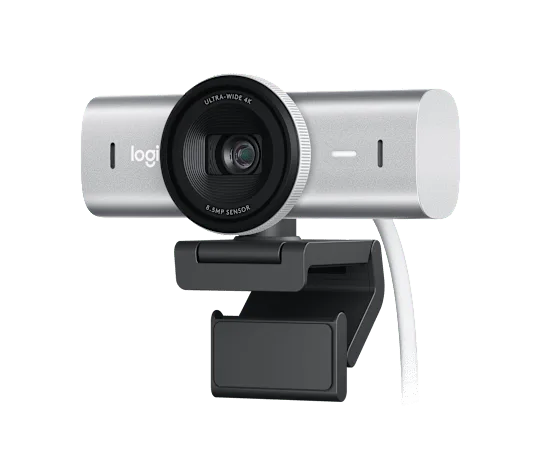
Image source: Web (Bing) / logitech.com (Web image (fair-use with source credit))
The Real-World Picture: Benefits of Going 4K
So, beyond the specs, what does upgrading to a 4K webcam actually do for you? It can significantly enhance your visual presence, whether you're at work, creating content, or just connecting with friends and family. The improvements are often more than just cosmetic.
Sharper Video, Better Impressions
The most direct benefit of 4K resolution is a sharper, more detailed image. This makes you look more polished and professional during video calls. When you're presenting yourself in a business context, a clearer image conveys attention to detail and can build better rapport.
For content creators, this means their audience sees a higher-quality production value from the start.
Think about how much clearer faces appear on a 4K TV compared to an older HD set. The same principle applies to webcams. The enhanced clarity makes participants feel more present and engaged, reducing the sense of distance that video conferencing can sometimes create.
Flexibility for Editing and Cropping
If you record your video calls or create content, 4K offers a lot more flexibility in post-production. Because the image is so detailed, you can actually zoom in digitally or crop the frame significantly without a drastic loss in quality. This is incredibly useful if you need to reframe a shot, zoom in on a specific area of the screen during a tutorial, or remove unwanted background elements.
For example, imagine you recorded a wide shot but later realize you only want to show your face and upper body. With a 4K recording, you can zoom in substantially and still maintain a crisp 1080p or even 4K output, which you simply couldn't do with a native 1080p recording.
Enhanced Professionalism for Remote Work
In today's remote-first world, your webcam is often your primary interface for professional interactions. A high-quality 4K webcam can elevate your professional image significantly. It signals that you value clear communication and are invested in presenting yourself effectively.
This is particularly true if you're frequently in client-facing roles or leading important team meetings. Viewers are less likely to be distracted by a grainy or pixelated image and can focus more on what you're saying. It contributes to a smoother, more professional, and ultimately more impactful virtual experience for everyone involved.
The Downsides: Where 4K Webcams Fall Short
While the allure of 4K is strong, it's not a universally perfect solution. There are significant technical and financial considerations that can make a 4K webcam a poor choice for some users. It's important to go into this with your eyes open to the potential drawbacks.
Bandwidth Hunger: It Needs a Strong Connection
Capturing and transmitting four times the pixels of 1080p video requires substantially more internet bandwidth. If your internet connection is already struggling with basic tasks, streaming 4K video will likely cause lag, dropped frames, or even disconnects.
Image source: Web (Bing) / swiftspeedtest.com (Web image (fair-use with source credit))
For smooth 4K streaming or video conferencing, you'll generally need an upload speed of at least 20-50 Mbps, and ideally more. If you're on a shared network or have a lower-tier internet plan, a 4K webcam might be more of a hindrance than a help. This is a critical factor to check with your internet service provider.
Hardware Demands: Is Your Computer Ready?
Processing a 4K video stream is a demanding task for your computer's CPU and GPU. If your computer is older or on the lower end of the performance spectrum, it might struggle to encode and process the high-resolution video smoothly. This can lead to stuttering video, audio-sync issues, or the webcam simply not performing at its best.
Most 4K webcams recommend a relatively modern processor and graphics card for optimal performance. If you plan to use 4K, it's wise to check the manufacturer's minimum system requirements and compare them against your computer's specifications, which you can often find in your system settings.
Cost: Is the Premium Justified?
Let's face it, 4K webcams are generally more expensive than their 1080p counterparts. While prices have come down, you're typically looking at a cost of $100 to $300 or even more for a good 4K model. For many users, the marginal improvement in video quality doesn't justify this higher price tag when a solid 1080p webcam can be had for $50-$80.
The premium price means you need to be sure you'll actually leverage the benefits of 4K resolution. If your use case doesn't demand that level of detail or flexibility, you might be better off saving money and opting for a high-quality 1080p webcam instead.
Who Needs a 4K Webcam (and Who Doesn't)?
Deciding whether a 4K webcam is right for you comes down to your specific use case. It's not a one-size-fits-all upgrade. Understanding who benefits most can help you make the smartest choice for your needs and budget.
Content Creators and Streamers
For individuals who create video content for platforms like YouTube, Twitch, or other streaming services, a 4K webcam can be a significant asset. The higher resolution provides more detail, which is crucial for viewers watching on larger screens. It also offers greater flexibility in editing, allowing creators to crop and zoom without sacrificing quality.
This is especially important for tutorials, product reviews, or any content where visual clarity is paramount.
Serious Remote Professionals
If your job involves frequent client-facing video calls, presentations, or leading important team meetings, a 4K webcam can boost your professional image. It makes you look more polished, attentive, and serious about your virtual presence. This can be a subtle but effective way to build trust and credibility with colleagues and clients, especially if your role requires detailed visual explanations or demonstrations.
Casual Users and Basic Video Calls
For the majority of users who primarily use webcams for occasional chats with friends and family, or for standard internal team meetings, a 4K webcam is likely overkill. A good 1080p webcam provides more than enough clarity for these purposes. Investing in 4K in this scenario often means paying for features you won't fully utilize, while also potentially running into bandwidth or hardware limitations.
Smart Comparisons: Alternatives to 4K
You don't always need the bleeding edge to get great video. Several excellent alternatives offer solid performance without the higher costs or technical demands of 4K. Considering these can help you find the best fit for your budget and needs.
The Reliable 1080p Webcam
A 1080p webcam, also known as a Full HD webcam, is the current standard for most general-purpose video communication. These cameras capture video at 1920 x 1080 pixels, which is sharp enough for most everyday video calls and many content creation tasks. They require less internet bandwidth and less processing power from your computer compared to 4K models.
You can find many highly reputable 1080p webcams that offer excellent autofocus, good low-light performance, and wide fields of view. For the average user, a well-chosen 1080p webcam hits a sweet spot of performance, cost, and ease of use.
Using Your Smartphone as a Webcam
Did you know your smartphone can often double as a high-quality webcam? Many modern smartphones, particularly those with excellent camera systems, can produce video that rivals or even surpasses dedicated webcams, including some 4K models. With the right app or software, you can connect your phone to your computer wirelessly or via USB.
This can be a cost-effective solution if you already have a good smartphone. You leverage its advanced camera sensors, image processing, and stabilization without buying new hardware. While setup can sometimes be a little more involved, the visual results can be surprisingly impressive.
Common Pitfalls to Avoid When Buying or Using 4K
Jumping into a 4K webcam without understanding the potential issues can lead to frustration. Many users overlook crucial factors that can diminish the perceived value of higher resolution. Being aware of these common mistakes can save you time, money, and hassle.
Overlooking Bandwidth and Hardware Needs
One of the most frequent missteps is buying a 4K webcam without confirming your internet upload speed and computer's processing power. Many 4K webcams recommend at least 20 Mbps upload for smooth streaming, and your computer needs a robust CPU and GPU to handle the data. If your system can't keep up, you'll experience lag, dropped frames, or a generally poor-quality image, negating the benefit of 4K.
Always check the minimum system requirements before purchasing.
Expecting Miracles in Poor Lighting
While 4K webcams often have better low-light performance than older models, they are not magic wands. In very dim conditions, even the best 4K sensor will struggle, leading to a grainy image or loss of detail. Relying solely on the webcam's capabilities without adequate room lighting will likely lead to disappointment.
Supplemental lighting, like a ring light or desk lamp, is often still necessary for truly clear, professional-looking video, especially as of 2026.
Settling for Basic Software Bundles
Some 4K webcams come bundled with software that might be limited in features or not optimized for high-resolution streaming. If you plan to do more than just basic video calls, investigate the webcam's compatibility with third-party software like OBS Studio or Streamlabs. Ensure the webcam's drivers and software support features like advanced color correction or frame rate control if those are important to you.
Data Snapshot: What to Expect
Understanding the typical technical specifications and costs associated with 4K webcams can help you set realistic expectations and make a more informed purchasing decision. These numbers provide a tangible benchmark.
Typical Price Ranges
As of 2026, entry-level 4K webcams generally start around $100, offering basic 4K capture at 30fps. Mid-range models, often featuring better sensors, wider fields of view, and improved low-light performance, can range from $150 to $250. High-end professional 4K webcams, which may include features like 60fps recording, advanced AI framing, or professional-grade lenses, can cost upwards of $300.
Bandwidth and Processing Demands
| Requirement | 1080p Webcam (Typical) | 4K Webcam (Typical) |
|---|---|---|
| Resolution | 1920 x 1080 | 3840 x 2160 |
| Upload Speed | 5-10 Mbps | 20-50+ Mbps |
| CPU Load | Low | Moderate to High |
| GPU Load | Low | Moderate to High |
| File Size | Smaller | Larger |
For example, a minute of uncompressed 4K video can easily consume several gigabytes of data, whereas a minute of 1080p video is typically in the hundreds of megabytes. This difference significantly impacts storage needs and upload times for recorded footage.
Frequently Asked Questions About 4K Webcams
Do I really need a 4K webcam for Zoom?
For most standard Zoom calls, a 1080p webcam is more than sufficient. 4K resolution offers benefits like sharper detail and cropping flexibility, but these are often unnecessary for casual or typical business meetings where bandwidth and processing can be constraints. If you're presenting detailed visuals or want the absolute best image quality, then 4K might be considered.
Will a 4K webcam work on an older computer?
It depends on the age and specifications of your computer. While a 4K webcam might physically connect, your computer may struggle to process the high-resolution video feed smoothly. Look for the webcam manufacturer's minimum system requirements, often listed with CPU and GPU recommendations, to determine compatibility.
If your computer is more than 5-7 years old, it might not provide an optimal experience.
How much faster does my internet need to be for a 4K webcam?
Your upload speed is key. For smooth 4K video conferencing or streaming, you'll generally need at least 20-50 Mbps upload speed. This is typically double or triple the requirement for a 1080p feed, which can often run well on 5-10 Mbps upload.
Check your current internet speed using an online speed test tool.
Can I record 4K video with any 4K webcam?
Most webcams advertised as "4K" can capture video at that resolution. However, the actual recording experience can depend on the included software and your computer's ability to handle the data. Some webcams might only achieve 4K at 30fps, while others might offer smoother 60fps.
Always check the product specifications for recording frame rates.
Is the microphone on a 4K webcam better?
Not necessarily. While some higher-end 4K webcams may include improved microphones, resolution doesn't directly dictate audio quality. Many premium 4K webcams prioritize video and may even suggest using a separate, dedicated microphone for optimal sound.
If audio is critical, research the microphone quality separately from the video resolution.
The Verdict: Should You Buy a 4K Webcam?
Ultimately, whether a 4K webcam is "worth it" hinges on your specific needs and resources. If you're a content creator, streamer, or a remote professional who places a high value on crystal-clear visuals and the flexibility to crop and edit, then investing in a 4K webcam could be a game-changer. The enhanced detail and professional appearance can significantly improve your output and online presence.
However, for the average user who engages in standard video calls or meetings, the benefits of 4K may not outweigh the drawbacks. The increased demands on your internet bandwidth, computer hardware, and budget can introduce more problems than they solve. In these cases, a high-quality 1080p webcam often provides an excellent balance of performance and practicality, delivering sharp, reliable video without the extra technical headaches.
Carefully assess your current setup and intended usage before making the leap to 4K.