What Is a Good Resolution for a Webcam?
You're looking at webcams and seeing specs like 1080p, 720p, or even 4K. It's easy to feel overwhelmed wondering what resolution actually matters for your video calls and online chats. The truth is, there's no single "best" answer; it totally depends on how you plan to use it and your internet connection.
Manufacturer specifications often list resolutions like 1920 x 1080 pixels for Full HD, but understanding the practical implications is key. We'll help you cut through the jargon and find the resolution that makes sense for your needs, whether it's for casual chats or important work presentations.
Decoding Webcam Resolution Numbers: 720p, 1080p, 4K, and Beyond
Webcam resolution tells you how much detail the camera can capture, essentially how many tiny dots of color (pixels) make up the image. Higher pixel counts generally mean a sharper, clearer picture. When you see "p" after a number, like 1080p, it refers to the number of horizontal lines of resolution, with progressive scan (a more modern display method).
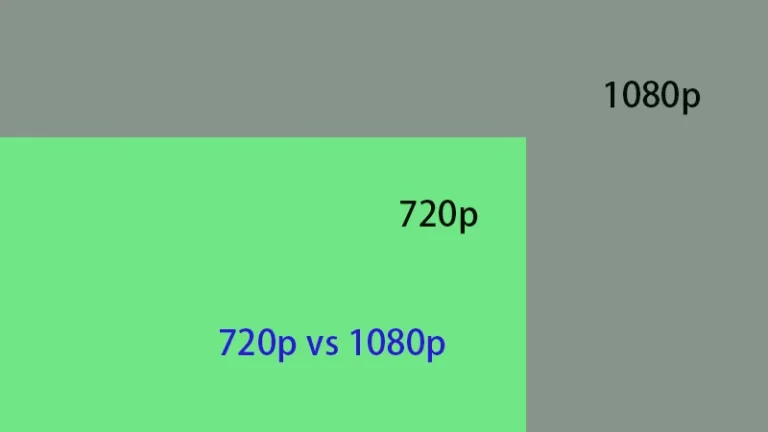
- 720p (HD): This means roughly 1280 pixels wide by 720 pixels tall. It's your standard high definition, good for basic video calls where extreme clarity isn't the top priority.
- 1080p (Full HD): This resolution is 1920 pixels wide by 1080 pixels tall. It's a significant step up in clarity from 720p and has become the go-to standard for many users.
- 1440p (QHD): Also known as Quad HD, this is 2560 pixels wide by 1440 pixels tall. It offers more detail than 1080p, fitting nicely in the middle for those wanting a bit more sharpness.
- 4K (UHD): This is approximately 3840 pixels wide by 2160 pixels tall. It delivers incredibly detailed images, but it comes with higher demands on your system and internet.
The National Institute of Standards and Technology (NIST) provides guidance on digital imaging standards, which underscores the importance of pixel density for image fidelity across various applications.
The BIG Factor: How Your Internet Speed Dictates Resolution
Higher resolution video means more data being sent. This is especially critical for your upload speed, which is how fast your internet can send information out to others. If your upload speed isn't fast enough for the webcam's resolution, your video will be choppy, laggy, or even freeze.
Think of it like trying to pour a gallon of water through a tiny straw, it's just going to back up.
- For 720p: Aim for at least 1-2 Mbps upload speed. This is usually manageable even on basic internet plans.
- For 1080p: You'll want at least 3-5 Mbps upload speed for smooth performance. This is where most modern webcams and internet connections perform well.
- For 1440p/4K: You’re looking at needing 10 Mbps or more for upload speed. If your internet speed test shows less than this, a 4K webcam will likely perform worse than a 1080p one.
A quick internet speed test, easily found by searching online, will show you your current upload and download speeds. Focus on the upload number.
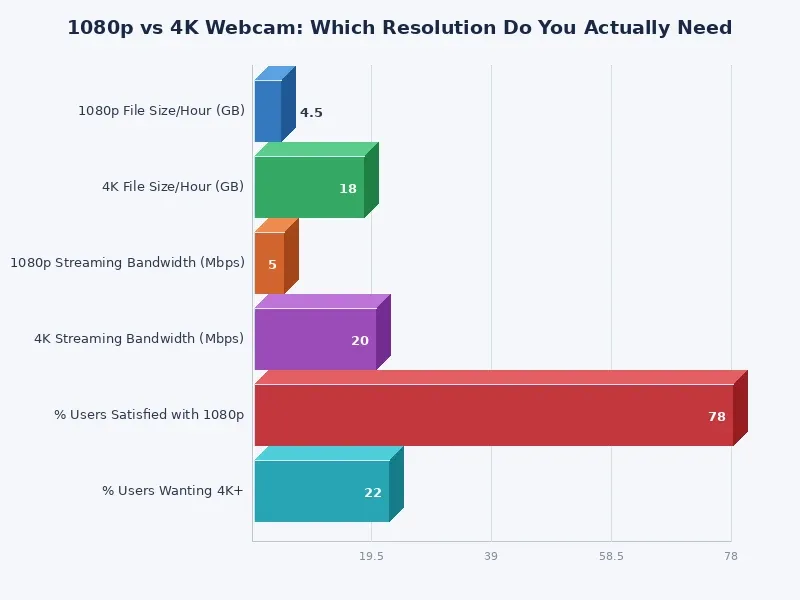
Image source: Bing (Web (fair-use with source credit))
Image source: Web (Bing) / howtogeek.com (Web image (fair-use with source credit))
Matching Webcam Resolution to Your Use Case
The resolution that's "good" for you depends heavily on what you'll be using your webcam for. What looks great for a casual chat might be insufficient for a professional presentation.
Casual Chats vs. Professional Meetings
For everyday video calls with friends and family, or when you're just checking in, 720p is often perfectly adequate. You'll be seen clearly, and it won't put a strain on your internet connection.
However, if you're participating in important work meetings, client calls, or any situation where you want to present a polished and professional image, 1080p is the standard. It offers a noticeable improvement in clarity, making your face and any background elements appear sharper. This resolution ensures you look attentive and well-presented without requiring extreme internet speeds.
Streaming and Content Creation Needs
If you're a streamer, YouTuber, or creating any kind of video content where visual quality is key, you'll want to consider higher resolutions. 1080p is a solid baseline for many content creators and works well for platforms like Twitch and YouTube. It provides a good balance between quality and file size.
For those aiming for top-tier production value, 1440p or 4K resolutions offer a significant boost in detail. This is especially beneficial if you plan to zoom in on certain aspects of your video or if your content involves showcasing intricate details. Keep in mind, however, that streaming 4K requires a very robust internet connection and a capable computer to process the high-resolution feed smoothly.
As of 2026, internet infrastructure continues to improve, making higher resolutions more accessible for streamers, but it's still a major consideration.
Common Webcam Resolution Mistakes to Avoid
When picking a webcam resolution, it's easy to make a few common slip-ups that end up costing you or delivering a poor experience. One big mistake is focusing only on the highest number without considering your actual needs. A 4K webcam might seem impressive on paper, but if your internet upload speed is only 3 Mbps, that super-high resolution will result in a terrible, stuttering video feed.
Another frequent error is overlooking your computer's capabilities. Processing high-resolution video, especially 4K, requires significant CPU and GPU power. If your laptop or desktop is a few years old or not particularly powerful, it might struggle to keep up, leading to laggy video or even application crashes.
It's about finding the right balance between the webcam's specs and your existing hardware and internet setup.
Why More Pixels Isn't Always Better
- Bandwidth Bottlenecks: High resolution means a larger data stream. If your internet connection can't handle sending that much data quickly, the video quality drops drastically, regardless of the camera's capability.
- Computer Overload: Your computer needs to encode and process the video feed. A resolution that's too high can overwork your system, causing slowdowns that affect not just the webcam feed but your entire computer.
- Dim Lighting Woes: In low-light conditions, a higher-resolution sensor might try to compensate by amplifying the image, leading to noticeable digital noise or graininess. Sometimes, a lower-resolution sensor optimized for low light can actually produce a clearer image in challenging conditions.
- Unnecessary Cost: Higher-resolution webcams often come with a higher price tag. If you don't genuinely need that level of detail, you're essentially paying for features you won't utilize.
Choosing the Right Webcam Resolution: Your Decision Guide
Let's simplify this. Think of it as a series of "if this, then that" scenarios to guide your choice. The goal is to match the webcam's capabilities with your environment and intended use.
Start with your primary use:
- If you mainly do casual video calls with friends and family:
- Decision: A 720p webcam is likely sufficient.
- Why: It provides clear enough video for recognition and conversation without demanding much from your internet or computer.
- If you regularly attend work meetings or need to look professional:
- Decision: Aim for 1080p.
- Why: This resolution offers a noticeable boost in clarity, making you appear sharper and more polished to colleagues and clients. It’s the industry standard for a reason.
- If you are a content creator, streamer, or presenter of detailed visuals:
- Decision: Consider 1440p or 4K, but only if your internet and computer can handle it.
- Why: These offer maximum detail for professional presentations or engaging streams. However, verify your upload speeds (10+ Mbps for 4K) and computer specs.
Next, factor in your internet connection:
- If your upload speed is consistently below 3 Mbps:
- Decision: Stick to 720p.
- Why: Pushing for 1080p or higher will lead to a frustratingly poor experience for everyone involved.
- If your upload speed is between 3-7 Mbps:
- Decision: 1080p is your sweet spot.
- Why: This range comfortably supports Full HD without significant bandwidth issues.
- If your upload speed is 10 Mbps or higher:
- Decision: 1440p or 4K are viable options.
- Why: You have the bandwidth to support these higher resolutions, allowing you to take advantage of their enhanced detail.
Frequently Asked Questions About Webcam Resolution
What is the difference between 720p and 1080p?
1080p resolution has nearly twice the number of pixels as 720p. This means 1080p images are much sharper and more detailed.
Is 4K webcam resolution overkill for everyday use?
For most casual video calls, yes, 4K is often overkill. It requires a very strong internet connection and a powerful computer, and the benefits may not be noticeable on smaller screens or with basic calls.
How much upload speed do I need for a 1080p webcam?
You generally need at least 3 to 5 Megabits per second (Mbps) of upload speed for smooth 1080p webcam performance.