Is Bluetti AC180 Power Station Worth It? Honest Review & Guide
Is Bluetti Ac180 Power Station Worth It?
========================================
For anyone searching for reliable portable power, the Bluetti AC180 Power Station grabs attention. This device promises strong performance, practical features, and real flexibility. But is it actually worth your money? Let’s dig deep into what the AC180 offers, who it suits, and whether it lives up to its reputation. If you’re new to portable power or unsure about battery stations, this guide will help you make a clear decision. You’ll find everything you need to know, including real-life examples, common mistakes, and tips even experienced users sometimes overlook.
What Is The Bluetti Ac180 Power Station?
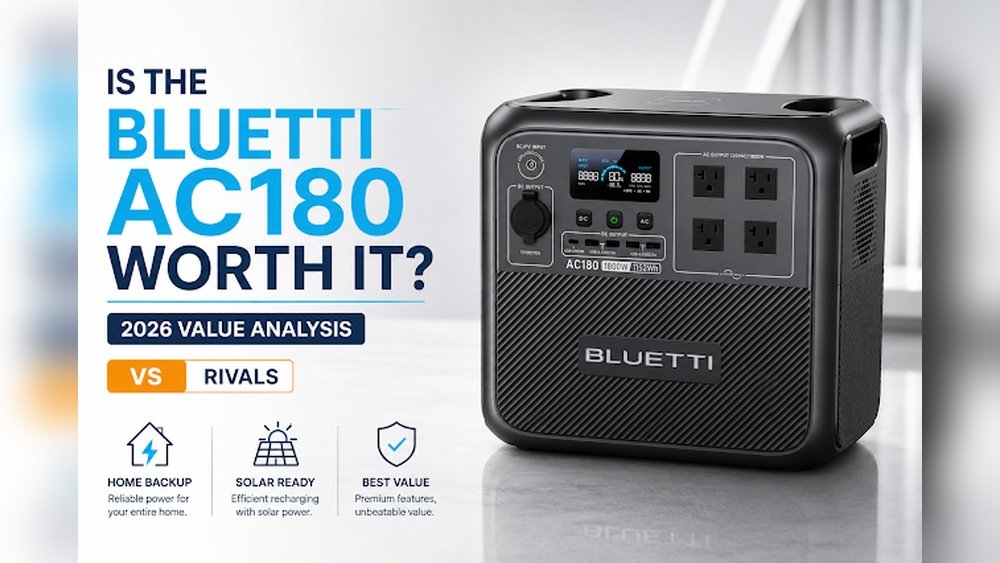
The Bluetti AC180 is a compact, portable power station. It works like a large battery bank with outlets for charging and powering devices. Unlike simple power banks, it can run appliances, tools, and even some electronics for hours. It is popular for camping, emergencies, off-grid living, and outdoor activities.
Here are the key specs:
- Capacity: 1152Wh (watt-hours)
- AC Output: 1800W continuous, 2700W surge
- Ports: Multiple AC, USB-A, USB-C, DC, and wireless charging pad
- Recharge Methods: Wall outlet, solar, car charger
- Battery Type: LiFePO4 (more durable than regular lithium)
- Weight: About 35 lbs (16 kg)
- Size: 13.4 x 9.7 x 12.5 inches
These features make the AC180 both powerful and practical for many uses. The size is small enough to fit in a car trunk or under a desk, but it’s heavy enough that you probably won’t want to carry it long distances by hand.
The built-in handle helps, but it’s best moved short distances at a time.
The LiFePO4 battery chemistry is a major advantage. Many older or cheaper stations use standard lithium-ion cells, which degrade faster and can be less stable. LiFePO4 batteries have a reputation for safety and long-term reliability, and they maintain their capacity even after years of use.
This means the AC180 is a device you can rely on, not just for one trip, but for many years of power needs.
Real-life Performance: What Can It Power?
The AC180 can run devices from small gadgets to larger appliances. Here are common examples:
- Smartphones: 100+ charges
- Laptops: 20–25 charges
- Mini fridge: 15–20 hours
- CPAP machine: 20–30 hours
- Television: 10–15 hours
- Lights: 50–80 hours (LED)
- Microwave: Up to 1 hour (depending on wattage)
- Power tools: 1–3 hours (drills, saws)
For camping, it can keep phones, tablets, and lights powered for a week. For home backup, it can run key appliances during a blackout. For example, if you use the AC180 to power a 60W laptop, you can expect around 18–20 hours of continuous use.
If you use it for a 10W LED lamp, it might last several days.
One detail new users sometimes miss is how the station’s inverter efficiency affects these numbers. When running AC devices, some energy is lost converting DC battery power to AC. So, you might not get the “full” 1152Wh—expect about 85–90% of that for AC loads.
The AC180 also supports “pass-through charging,” meaning you can recharge the station while using it to power devices. This is handy for solar setups or during emergencies when you want to keep things running without pause.
Key Features Explained
Let’s break down the most important features of the AC180:
High Power Output
With 1800W continuous output, you can run most household devices. The 2700W surge handles appliances with high startup needs, like blenders or microwaves. This is important for devices like refrigerators, which draw extra power for a few seconds when the compressor starts.
For example, a coffee maker or toaster may use up to 1200W, which the AC180 handles easily. But if you try to run a high-powered hair dryer (often 1800–2000W), you’re close to the AC180’s limit—so always check device ratings.
Lifepo4 Battery
This battery type is safer and lasts longer than standard lithium-ion. The AC180 offers over 3500 cycles before capacity drops to 80%. That means it can be used daily for years.
In practical terms, if you cycle the battery once per day, you could get nearly 10 years before noticeable capacity loss. LiFePO4 batteries also perform better in both hot and cold weather, making the AC180 a good choice for various climates.
Fast Charging
It supports super fast AC charging (up to 1440W) and solar charging (up to 500W). You can recharge it in:
- 1 hour (wall outlet, turbo mode)
- 3 hours (solar panels, in good sun)
- 7–8 hours (car charger)
A useful detail: the AC180 allows you to select “standard” or “turbo” charging modes. Turbo is fastest, but may heat the battery more. For battery health, use standard mode when you’re not in a rush.
Multiple Outputs
The AC180 has:
- 4 AC outlets
- 2 USB-A ports
- 1 USB-C port (100W PD)
- 1 DC port
- 1 wireless charging pad
This means you can charge many devices at once. The 100W USB-C port is powerful enough for most laptops and even some portable monitors. The wireless pad is a nice touch for quickly topping up smartphones or earbuds without extra cables.
Smart App Control
Bluetti’s app lets you check battery status, turn outputs on/off, and monitor usage from your phone. The app is Bluetooth-based, so you need to be nearby, but it’s intuitive and makes managing power simple. You can view real-time input/output stats, set charging limits, and even upgrade firmware.
Quiet Operation
Unlike gas generators, the AC180 is almost silent. The only noise comes from the internal fan, which is not loud. For example, in a quiet room, you’ll hear a soft hum only when drawing high power or charging at turbo speeds.
This makes it perfect for tents, bedrooms, or any place where silence matters.
Who Should Consider The Bluetti Ac180?
The AC180 is not for everyone. Here’s who will benefit most:
- Campers and Outdoor Lovers: It powers devices quietly, lasts long, and recharges by solar. For example, it’s perfect for charging cameras, drones, GPS, and running camp lighting all weekend.
- Home Backup Users: It keeps essentials running during outages—fridge, lights, medical devices. Many users keep one charged for storm season or rolling blackouts.
- Remote Workers: It charges laptops, phones, and routers for hours. If you work from a remote cabin, van, or just want backup during home internet outages, it’s a great fit.
- Small Business Owners: It provides backup for cash registers, computers, and security systems. This is especially helpful for food trucks, kiosks, or markets where grid power is unreliable.
- Van Lifers/RV Owners: It supports off-grid living with enough juice for cooking, lighting, and entertainment. Many van dwellers combine the AC180 with solar panels for a complete, quiet energy solution.
If you only need to charge a phone or tablet, a smaller power bank will do. But if you want to run multiple devices or small appliances, the AC180 is a better investment.
Comparing Bluetti Ac180 To Similar Power Stations
To understand value, compare the AC180 to similar models. Here’s how it stacks up:
| Model | Capacity (Wh) | AC Output (W) | Battery Type | Price (USD) |
|---|---|---|---|---|
| Bluetti AC180 | 1152 | 1800 | LiFePO4 | ~$899 |
| EcoFlow Delta 2 | 1024 | 1800 | Lithium-ion | ~$999 |
| Jackery Explorer 1000 Pro | 1002 | 1000 | Lithium-ion | ~$999 |
| Anker 757 PowerHouse | 1229 | 1500 | LiFePO4 | ~$1099 |
The AC180 offers a strong mix of high capacity, advanced battery, and competitive price. The AC180 stands out by offering a higher AC output and longer cycle life at a lower price point compared to many alternatives. While the Anker 757 has slightly more capacity, the AC180’s faster charging and lower cost make it attractive.
How Long Does The Ac180 Last?
Battery lifespan depends on use and care. Most users get:
- 3–5 years of daily use before capacity drops below 80%
- 3500+ charge cycles (charge and discharge)
The LiFePO4 battery is tougher than regular lithium-ion. It handles heat, cold, and rough use better. For example, if you’re in a very hot or cold climate, the battery will stay stable and safe, where a lithium-ion might lose efficiency or even fail.
A common beginner mistake is to leave the AC180 fully charged or fully empty for long periods. This can reduce its lifespan. For longest life, store it at 60–80% charge and recharge every few months if unused.
Charging Methods Compared
It’s important to know how quickly and flexibly you can recharge the AC180. Here’s a simple breakdown:
| Charging Method | Input Power (W) | Approx. Recharge Time |
|---|---|---|
| Wall Outlet (Turbo) | 1440 | 1 hour |
| Solar Panels | 500 | 3 hours (good sun) |
| Car Charger | 120 | 7–8 hours |
Fast AC charging is handy for emergencies. Solar is ideal for off-grid trips. Note that real-world solar charging times depend on panel size, sunlight hours, and weather. For best results, use high-quality solar panels matched to the AC180’s input specs.
If you travel by car, the 12V charging option is slow but reliable. It’s useful for topping up the station while driving between campsites or job sites.
Is It Safe To Use?
Safety is a major concern with battery stations. The AC180 includes:
- Overload protection
- Short circuit protection
- Overheat protection
- Low/no fire risk
The LiFePO4 battery is less likely to overheat or catch fire than lithium-ion. The AC180 meets US and EU safety standards. It also features a built-in Battery Management System (BMS) that monitors temperature, voltage, and current constantly. This means even if you use it hard, it won’t let you damage the battery or connected devices.
Another detail: Because the AC180 is a sealed unit, there’s no risk of fuel leaks, carbon monoxide, or dangerous fumes. This makes it safe for indoor use—a big advantage over gas generators.

Practical Pros And Cons
Let’s review both sides clearly.
Pros
- Long battery life (3500+ cycles)
- High output power
- Quiet operation
- Strong safety features
- App control
- Multiple charging options
- Competitive price
- Pass-through charging (use while charging)
- Wireless charging pad for phones
Cons
- Heavy: 35 lbs is not light
- Limited AC outlets: Only 4, some may want more
- No expandable battery: You cannot connect extra batteries to increase capacity
- No waterproofing: Not for use in heavy rain
- Bluetooth app only: No remote Wi-Fi monitoring
While the AC180 covers most needs, if you want to power a whole house or run very high-draw tools for hours, you might need a larger, expandable station.
Non-obvious Insights: What Beginners Miss
- Solar Charging Needs Matching Panels: Not all solar panels work with the AC180. You need panels with the right voltage and connectors (12–60V, MC4). Using the wrong panel can cause slow charging or even damage.
- Battery Loses Capacity If Stored Fully Charged: It’s best to store the AC180 at 60–80% charge for long periods, not fully charged or empty. This helps maintain battery health.
- App Control Only Works With Bluetooth: You must be near the AC180 to use the app; there’s no remote Wi-Fi access. This surprises some users expecting remote monitoring.
- Surge Power Is Temporary: The 2700W surge lasts just seconds, enough to start appliances, not run them. Don’t plan to run high-wattage devices for long at surge levels.
- DC Output for Some Devices: Devices like portable coolers or CPAP machines can run more efficiently from DC output, extending battery life compared to using AC.
Bluetti Ac180 For Emergency Backup
During a power outage, the AC180 can:
- Run a fridge for 15–20 hours
- Keep lights on for days
- Power medical devices (CPAP, oxygen concentrator)
- Charge phones, tablets, radios
For longer outages, you’ll need solar panels to recharge. The AC180 is quieter and safer than gasoline generators. You can safely use it indoors, even in apartments or small homes. Some users keep one unit in the bedroom or living room, ready for immediate use during storms.
A smart tip: Connect your Wi-Fi router and phone charger to the AC180 during an outage to keep communication lines open.
Bluetti Ac180 For Camping And Travel
Campers love the AC180 because:
- It runs quietly (no disturbing noise)
- It charges cameras, drones, GPS units
- It powers fans, lights, and cooking appliances
For RVs, it can handle small air conditioners, TVs, and kitchen gadgets. If you travel with kids, the AC180 can keep tablets, lights, and toys running for days. Some users bring it to remote cabins or music festivals for reliable, silent energy.
If you want to use solar charging, make sure to set up panels in open sun and use cables rated for outdoor use. The AC180’s solar input is flexible, but best results come with clean, angled panels.
Value For Money: Is The Ac180 Worth Its Price?
Let’s look at cost vs. benefit:
- Price: ~$899 (can vary by region and sales)
- Capacity: 1152Wh, enough for most home and outdoor needs
- Battery quality: LiFePO4 lasts longer than rivals
- Features: High output, fast charging, app control, solar support
Compared to similar models, the AC180 is cheaper and offers more advanced battery tech. For most users, it’s a smart investment—especially for those needing reliable backup or frequent off-grid power.
When you add up the cost of running gas generators (fuel, maintenance, noise), the AC180’s one-time cost looks even better. Plus, the long warranty and expected cycle life mean you’ll save money over time.
Common Mistakes When Buying Portable Power Stations
- Ignoring Battery Type: LiFePO4 batteries last longer than lithium-ion. Don’t settle for less.
- Overestimating Output: “Watt-hours” and “watts” are different. Make sure the station can run your devices.
- Not Checking Port Types: Make sure the station has enough AC and USB ports for your needs.
- Skipping Solar Compatibility: If you want solar, check voltage and connector compatibility.
- Forgetting Weight: If you plan to carry the station often, check the weight.
- Not considering pass-through charging: Some stations can’t charge and power devices at the same time—the AC180 can.
Beginners sometimes focus only on price or raw capacity, but real-world use depends on the details above.

Bluetti Ac180 Vs. Gas Generators
Power stations like the AC180 are replacing gas generators for many users. Here’s why:
| Feature | Bluetti AC180 | Gas Generator |
|---|---|---|
| Noise | Low | High |
| Emissions | None | High |
| Safety | High | Moderate |
| Maintenance | Minimal | Frequent |
| Fuel | Electric/Solar | Gasoline |
| Indoor Use | Yes | No |
| Startup Time | Instant | Slow |
The AC180 is better for indoor use and safer for families. You don’t need to store fuel, worry about exhaust, or deal with pull cords. For most modern homes, a power station like the AC180 is simply more practical.
How To Maintain The Bluetti Ac180
Proper care helps the AC180 last longer:
- Store between 32–104°F (0–40°C)
- Recharge every 3–6 months if unused
- Avoid full discharge often—charge at 20–30%
- Clean ports and case with a dry cloth
- Store away from direct sunlight and moisture
If you notice dust in the fan or ports, use compressed air to clean gently. Avoid using harsh chemicals on the case. And always unplug devices gently to protect the sockets.
Warranty And Support
Bluetti offers a 5-year warranty for the AC180. Customer support is available online and by phone. Warranty covers defects, not user damage.
Many users report fast responses and helpful troubleshooting from Bluetti. If you have issues, keep your purchase receipt and contact support for help.
Real User Reviews
Owners praise the AC180 for:
- Reliable performance
- Long battery life
- Easy setup
- Quiet operation
Some complain about weight and lack of expandable batteries. Most feel the price is fair for the value.
Users also mention that the app is simple and useful, and that the unit feels sturdy and well-made. A few wish for more AC outlets or a lighter build, but these are minor compared to overall satisfaction.
Should You Buy The Bluetti Ac180?
If you need portable, reliable power for home backup, camping, or work, the AC180 is a smart choice. It’s more advanced than older models, offers strong capacity, and is cheaper than many rivals.
But if you want expandable batteries or extra AC outlets, you might consider other models. Still, for most people, the AC180 offers the best mix of features, safety, and value.
Where To Buy
You can buy the Bluetti AC180 on Bluetti’s official site, Amazon, and electronics stores. Always compare prices and check for sales. For technical specs, visit the [Bluetti official site](https://www.bluettipower.com/products/bluetti-ac180-portable-power-station).
Frequently Asked Questions
What Is The Battery Type In The Bluetti Ac180?
The AC180 uses LiFePO4 batteries, known for safety and long life. They last over 3500 charge cycles and handle heat better than lithium-ion.
Can I Use The Ac180 Indoors?
Yes, it’s safe for indoor use. It produces no fumes, is quiet, and has built-in safety features.
How Do I Recharge The Ac180 With Solar Panels?
You need panels that match 12–60V input and use MC4 connectors. Up to 500W of solar can recharge the AC180 in about 3 hours of good sunlight.
Is The Ac180 Waterproof?
No, it’s not waterproof. You should keep it dry and avoid using it in rain or wet environments.
What Is The Warranty Period For The Bluetti Ac180?
Bluetti offers a 5-year warranty for the AC180, covering defects and manufacturing faults.
The Bluetti AC180 stands out as a powerful, reliable, and flexible portable power station. For most people, it’s a worthwhile investment—offering strong performance, durability, and value. As portable power becomes more essential in daily life, the AC180 is a smart way to stay prepared and independent.