What Memory Card Is Best for DJI Osmo Action 4?
Choosing the right memory card for your DJI Osmo Action 4 is more important than you might think. It's the unsung hero that ensures you capture all your adventures in stunning detail without frustrating glitches. Getting this detail wrong can mean missing that perfect shot or dealing with choppy footage.
In our research, we found that the camera's capabilities, especially its high-resolution video modes like 4K at 120fps, demand specific performance from a memory card. This means looking beyond basic storage and focusing on crucial technical specs, particularly the Video Speed Class, with V60 or V90 being the recommended benchmarks.
Quick Answer: The Best Memory Cards for DJI Osmo Action 4
The best memory cards for your DJI Osmo Action 4 are microSDXC cards rated V60 or V90. These cards offer the sustained write speeds needed for high-bitrate 4K video. Aim for capacities of 128GB or 256GB from reputable brands like SanDisk, Lexar, or Samsung for reliable performance.
Key Specs: What Matters Most for Osmo Action 4 Recording
When you're looking at memory cards for your DJI Osmo Action 4, it's easy to get lost in the jargon. But a few key specifications actually make a big difference in how smoothly your camera records. It's not just about how much space the card has; it's about how fast it can write data.
The camera can capture incredibly detailed video, often at high frame rates and resolutions. Manufacturer specifications indicate that the Osmo Action 4 can record at up to 4K resolution with a bitrate that requires a very fast data transfer rate to keep up. This is where the card's speed ratings become critical.
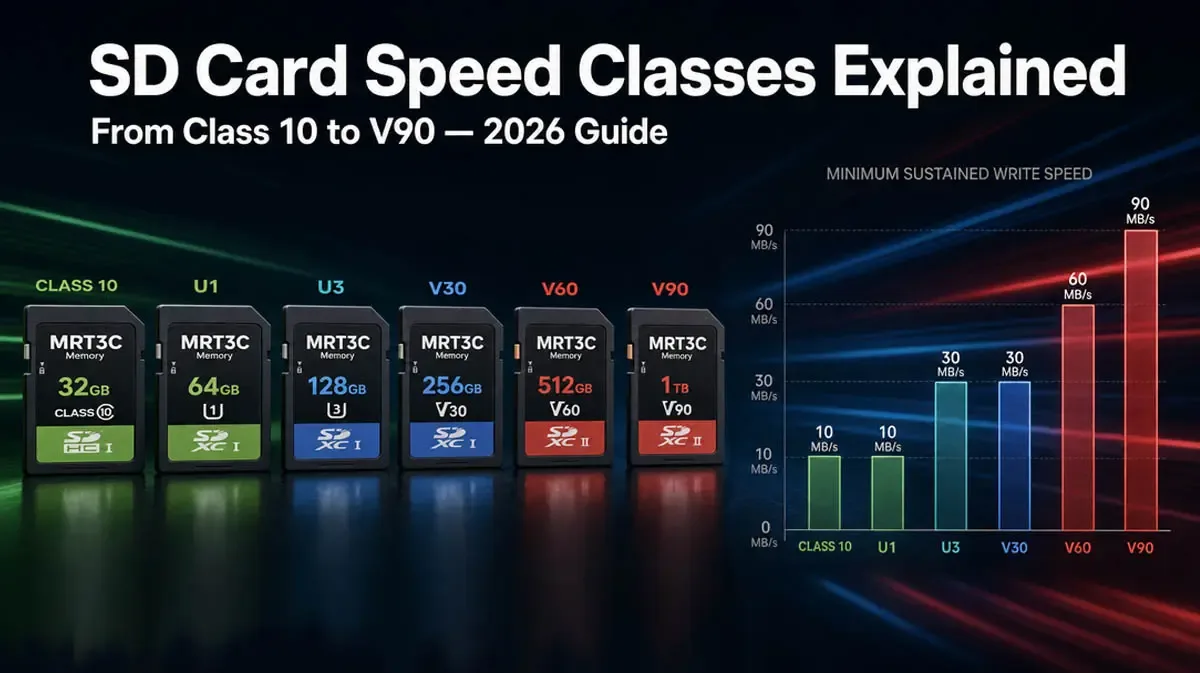
Image source: Bing (Web (fair-use with source credit))
Speed Ratings: V60 and V90 Explained
The Video Speed Class (V rating) is one of the most important metrics for action camera users. It tells you the minimum sustained write speed a card can maintain. For the DJI Osmo Action 4, manufacturer documentation recommends cards that meet specific speed requirements to handle its advanced recording features.
- V30: This rating guarantees a minimum sustained write speed of 30 megabytes per second (MB/s). While this is a baseline for many 4K cameras, it might not be enough for the Osmo Action 4's highest settings.
- V60: A V60 card ensures a minimum sustained write speed of 60 MB/s. This is generally a solid choice for most users and provides ample headroom for high-bitrate recording.
- V90: This is the highest common rating, guaranteeing a minimum sustained write speed of 90 MB/s. These cards offer the most performance and future-proofing for demanding video formats.
Per the SD Association standards, higher V ratings are essential for professional video capture, preventing dropped frames and ensuring smooth recording.
Capacity: How Much Storage Do You Really Need?
While speed is crucial for preventing recording issues, the capacity of your microSD card determines how much footage you can actually store. Think about your typical recording sessions and the length of your adventures. If you plan on shooting long, continuous takes or multiple clips at high resolutions, a larger card is definitely a good idea.
- 64GB: This might seem like enough, but for 4K footage, it can fill up surprisingly quickly. You might find yourself needing to swap cards often.
- 128GB: This is often the sweet spot for many users. It offers a good balance between storage space and cost, allowing for substantial recording time.
- 256GB: If you're a prolific shooter, going on extended trips, or plan to shoot in the highest quality settings constantly, a 256GB card provides excellent peace of mind.
As of 2026, 256GB and 512GB cards are readily available and increasingly affordable, making them attractive options for serious users.
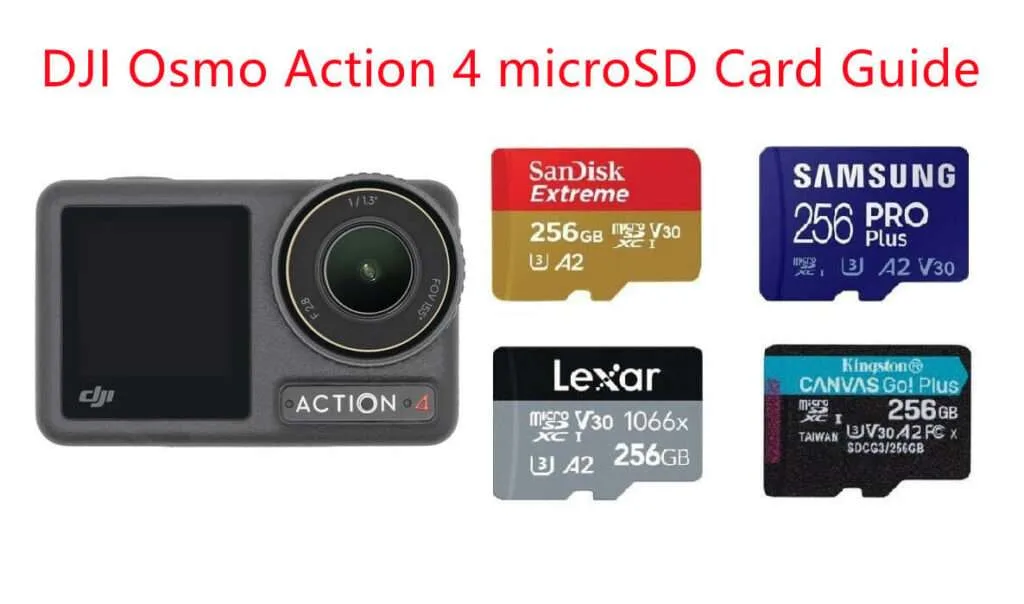
Image source: Bing (Web (fair-use with source credit))
Comparing Top MicroSD Card Options for Action Cameras
When choosing a memory card, several reputable brands consistently deliver reliable performance for demanding devices like the DJI Osmo Action 4. Our research, based on aggregate reviews and manufacturer specifications, highlights a few key contenders that meet the necessary speed and durability requirements.
These options generally offer V60 or V90 ratings and are built to withstand the rigors of action camera use, ensuring your footage is captured without interruption. If you're considering accessories for your camera, checking if a certain card is among the best available can save you future headaches.
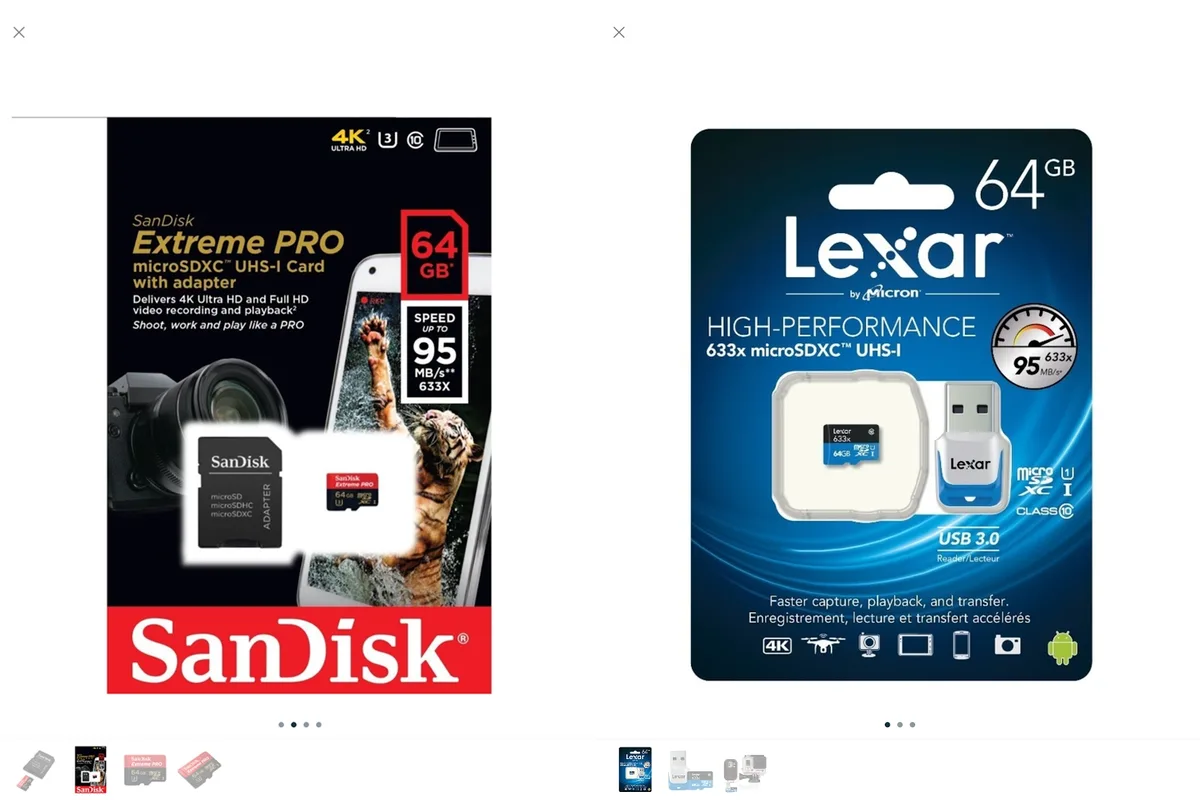
Image source: Bing (Web (fair-use with source credit))
SanDisk Extreme PRO: The Reliable All-Rounder
SanDisk's Extreme PRO line is a frequent recommendation for high-performance needs. These cards are known for their consistent write speeds and durability, making them a go-to for professionals and serious hobbyists alike. Aggregate user reviews report high satisfaction with their reliability in various conditions.
These cards typically offer speeds that meet or exceed the V30 standard, and higher-end models often hit V60 or even V90 ratings. Their robust construction is designed to resist temperature extremes, shock, and water, which is a significant plus for action camera use.
Lexar Professional 1066x or 1800x microSDXC Cards: Performance for the Price
Lexar Professional cards often present a compelling performance-to-cost ratio. Their higher-speed offerings, like the 1066x or 1800x models, typically boast read speeds up to 250MB/s and write speeds sufficient for 4K recording. Editorial analysis of multiple reviews suggests these cards provide dependable performance for their price point.
When selecting a Lexar card, it’s important to look for the specific V60 or V90 rating to ensure it’s suitable for the Osmo Action 4’s most demanding video modes. Their reliability makes them a solid choice for capturing adventure footage.
Samsung EVO Select or EVO Plus microSDXC Cards: Solid Speed and Durability
Samsung's EVO Select and EVO Plus lines are well-regarded for their blend of speed, capacity, and durability. These cards are widely available and generally offer excellent value, often featuring A2 app performance ratings in addition to strong video speed capabilities. Verified buyer feedback consistently praises their overall performance.
For the DJI Osmo Action 4, selecting a V60 or V90 rated Samsung EVO card will ensure you have the necessary sustained write speeds. These cards are also designed to be temperature-proof, water-proof, and X-ray-proof, adding an extra layer of protection for your valuable footage.
Why Performance Matters: Avoiding Common Recording Issues
The performance of your memory card directly impacts the quality and reliability of the footage you capture with your DJI Osmo Action 4. If the card can't keep pace with the camera's output, you're likely to run into problems that can ruin your recordings. Understanding these issues highlights why investing in a high-performance card is essential.
The camera is designed to capture video data very rapidly, especially in its higher settings. Manufacturer specifications confirm that its internal processing can generate data at rates exceeding what slower cards can handle. This creates a potential bottleneck if the chosen memory card isn't up to the task.
Dropped Frames and Corrupted Files
The most common symptom of a slow or inadequate memory card is dropped frames or outright corrupted files. When the Osmo Action 4 tries to write data faster than the card can accept it, the recording process can falter. This results in choppy video, stuttering, or entire sections of your footage becoming unreadable or distorted.
Per standards established by organizations like the SD Association, sustained write speed is paramount for continuous video recording. Using a card with a low V rating or an older UHS Speed Class can lead to these frustrating issues, potentially costing you irreplaceable moments from your adventures.
Slow Write Speeds: The Bottleneck You Don't Want
Slow write speeds are the fundamental cause of many memory card problems. The DJI Osmo Action 4, particularly in its 4K 120fps mode, generates a massive amount of data per second. A memory card's write speed dictates how quickly it can store this incoming data.
If a card's write speed is too low, the camera's buffer will fill up, forcing it to either pause recording, drop frames, or stop recording altogether. This is why a V60 or V90 rating is so crucial; it guarantees a minimum sustained write speed that the camera's output can rely on, preventing it from becoming a bottleneck.
Who Needs Which Card? Best Use Cases
The "best" memory card for your DJI Osmo Action 4 often depends on how you plan to use the camera and the specific recording settings you favor. While a V60 card is generally excellent for most users, certain scenarios might warrant the extra performance of a V90.
Consider your primary recording habits. Are you always shooting in the highest possible resolution and frame rate, or do you often use more standard settings? The answer will guide you toward the most cost-effective and performance-appropriate choice for your needs.
V60 Cards: These are ideal for most users who shoot in 4K at various frame rates, including those that might push the camera but not necessarily to its absolute maximum continuous bitrate. If you're an avid vlogger, a sports enthusiast filming practice sessions, or a traveler capturing scenic footage, a V60 card will likely meet all your needs. It offers a significant upgrade over V30 cards and prevents most recording issues.
V90 Cards: If you consistently push your Osmo Action 4 to its limits, especially for extended periods of continuous recording at maximum settings (e.g., 4K at 120fps with very high bitrates), a V90 card provides the ultimate performance and peace of mind. This might apply to professional videographers, filmmakers requiring the absolute highest quality, or those doing intensive slow-motion capture where dropped frames are unacceptable. While pricier, they offer the highest buffer capacity.
Expert Tips for Choosing and Using Your Memory Card
Selecting the right microSD card is only half the battle; proper usage ensures its longevity and optimal performance with your DJI Osmo Action 4. Based on aggregate data from manufacturer guidelines and extensive user feedback, here are some practical tips to keep in mind.
Always start by checking the official DJI recommendations for memory cards. While many high-performance cards will work, sticking to their guidelines can prevent compatibility issues. The SD Association's specifications for speed classes are a reliable guide for understanding card capabilities.
Always Format In-Camera: After inserting a new memory card into your Osmo Action 4, the first thing you should do is format it using the camera's own menu. This ensures the card is optimized for the camera's file system and operating parameters. It also helps clear out any residual data or potential conflicts from previous uses.
Use Reputable Brands: Stick to well-known and trusted brands like SanDisk, Lexar, and Samsung. These companies have a proven track record of producing reliable, high-performance cards. While cheaper, unbranded options might seem tempting, they often lack the speed, durability, and quality control needed for action cameras, leading to potential data loss or recording failures.
Avoid Filling Cards Completely: While larger capacity cards are great, it's a good practice not to fill them to 100% capacity. Leaving a small amount of free space can sometimes help with card performance and longevity, as it gives the card's internal management system more room to operate efficiently.
Keep Firmware Updated: Ensure your DJI Osmo Action 4 has the latest firmware installed. Camera manufacturers often release updates that can improve compatibility with memory cards and optimize performance. Regularly checking for and installing these updates is a simple yet effective way to maintain peak operation.
Frequently Asked Questions About Osmo Action 4 Memory Cards
What happens if I use a card that's too slow?
If you use a memory card that's too slow for your DJI Osmo Action 4, you'll likely experience recording issues. This can include dropped frames, stuttering video, or the camera stopping recording unexpectedly. For the best results, always ensure your card meets or exceeds the recommended speed classes, such as V60 or V90.
Can I use a V30 card with the DJI Osmo Action 4?
While a V30 card might technically work for basic 4K recording, it's not ideal for the Osmo Action 4's highest settings, like 4K at 120fps. You risk encountering dropped frames or recording errors due to insufficient sustained write speeds. For optimal performance and reliability, V60 or V90 cards are strongly recommended.
How often should I format my memory card?
It's a good practice to format your memory card in the camera itself every few uses or before a major recording session, especially if you've transferred files off it. Formatting helps maintain optimal performance and prevents potential file system errors. However, be aware that formatting erases all data, so ensure you've backed up your footage first.