Best Cycling Computer: Top Picks For Every Ride
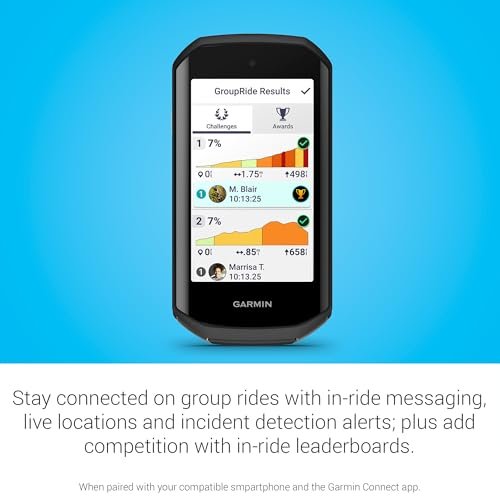
The Garmin Edge 1050 is the best cycling computer for riders who want maps, training tools, and a bright touch display.
You know the feeling: your phone is buried in a pocket, your route has one more surprise turn, and your ride data is hard to read in bright sun. A good bike computer fixes that small but real problem. It puts speed, distance, heart rate, elevation, and navigation where you can see them at a glance. I compared premium GPS units, compact training computers, and simple wireless models to help you find the Best Cycling Computer for your bike, riding style, and budget.
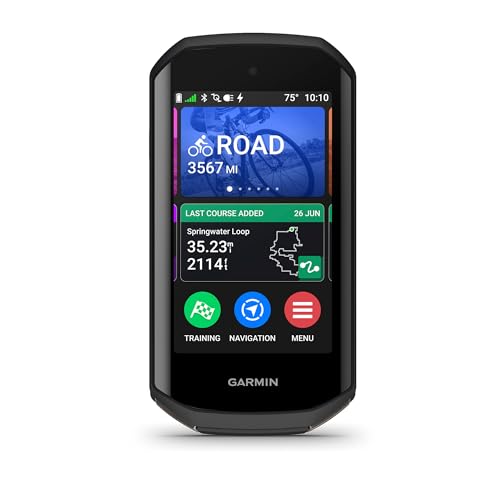
Garmin Edge® 1050, Premium Cycling…
Premium GPS cycling computer with vivid color touchscreen display combines superior navigation, planning and performance tracking, cycling awareness and smart connectivity Battery life: In demanding use cases, get up to…
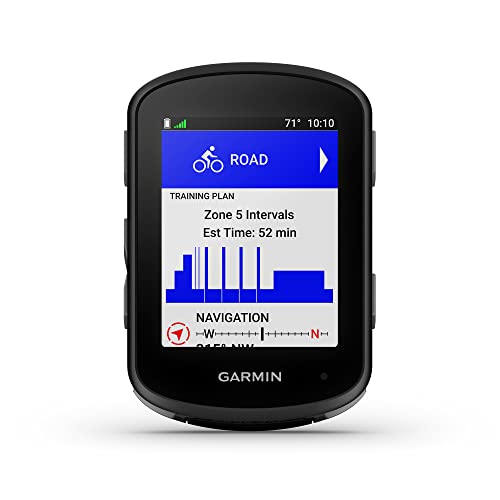
Garmin Edge 540, Compact GPS…
Advanced GPS cycling computer with button controls combines superior navigation, planning and performance tracking, cycling awareness and smart connectivity Battery life: up to 26 hours in demanding use cases; up…
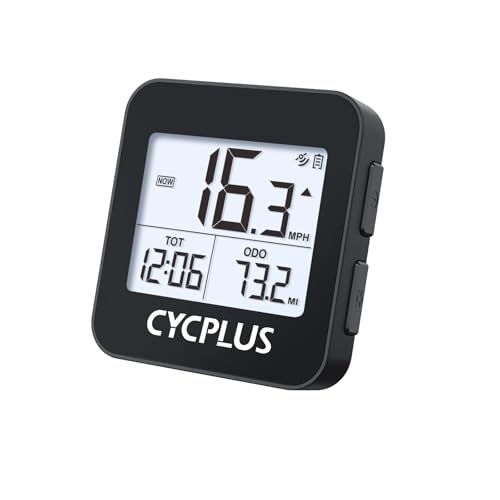
CYCPLUS Wireless GPS Bike Computer…
【Dynamic GPS Positioning】- This bike computer with higher sensitivity, higher accuracy, faster positioning. The GPS signal tracks your route, it will display ride time, riding distance, total riding time, total…
Garmin Edge 1050

The Garmin Edge 1050 is a premium cycling computer built for riders who want a large screen and deep ride data. Its color touchscreen makes maps, graphs, and workout pages easy to read while riding. The unit supports GPS navigation, structured training, cycling dynamics, and compatibility with many ANT+ and Bluetooth sensors. Its size feels more like a small cycling dashboard than a basic speed meter.
I like this model for long road rides, fast group rides, and training blocks where clear data matters. The screen responds quickly, and the map view gives you helpful route context before a turn. Smart alerts, climb information, and connected features can make a long day feel more controlled. Like most advanced computers, it offers the best experience after you spend time setting up profiles, sensors, and data fields.
Pros:
- Large, bright color touchscreen
- Detailed maps and turn-by-turn navigation
- Strong training and cycling analytics
- Works with many heart rate, power, radar, and cadence sensors
- Useful climb and route awareness features
- Premium build quality for serious riders
Cons:
- Costs much more than a basic bike computer
- Touch controls may feel less ideal with wet gloves
- Larger body adds more weight and handlebar space
My Recommendation
I recommend the Edge 1050 to cyclists who want the most complete feature set in this group. It suits road racers, endurance riders, coaches, and cyclists who use power meters or several sensors. The large display helps riders who dislike squinting at small maps or data fields. If your goal is simply to check speed and miles, this is more computer than you need.
For riders who want the Best Cycling Computer with premium navigation and training tools, the Edge 1050 is a strong choice. It has the screen, processing power, and sensor support to grow with your riding. Its high price is the main barrier, but the value improves for people who ride often and use advanced features.
Garmin Edge 540

The Garmin Edge 540 is a compact GPS cycling computer with a strong focus on training. It uses physical buttons instead of a touchscreen, which can be a real advantage in rain, cold weather, or rough gravel. The smaller body fits neatly on a road bike, gravel bike, or mountain bike cockpit. It can show speed, distance, elevation, navigation, training load, recovery details, and data from compatible sensors.
This model strikes a nice balance between size and capability. I find button control easier when I wear thick gloves or ride on broken pavement. The display is not as large as the Edge 1050, but careful data-field setup keeps the key numbers easy to find. Riders who enjoy structured workouts will appreciate its training functions, while casual riders may need time to learn the menus.
Pros:
- Compact and light design
- Reliable button control in poor weather
- Advanced training and performance metrics
- GPS navigation with route guidance
- Broad sensor and accessory compatibility
- Excellent fit for road, gravel, and mountain bikes
Cons:
- No touchscreen for quick map movement
- Small display takes more effort to read than a large unit
- Advanced menus may overwhelm new riders
My Recommendation
The Edge 540 is best for serious cyclists who want deep training data without a large computer on the bars. It works especially well for riders who use a power meter, heart rate strap, cadence sensor, or smart trainer. It also suits riders who prefer buttons and want reliable control in wet weather. I would choose it over a touchscreen model for long gravel events or winter training.
If you want a compact Best Cycling Computer for structured training, the Edge 540 deserves a close look. It gives you many high-end tools while keeping the size and price below Garmin’s flagship class. It may not feel as simple as an entry-level computer, but it offers excellent long-term value for an active cyclist.
CYCPLUS G1 Wireless GPS Computer

The CYCPLUS G1 is a small wireless GPS bike computer made for riders who want basic ride data without a complex setup. Its 2-inch display shows core information such as speed, distance, time, and route-related data. The 70-gram design keeps it unobtrusive on a handlebar. Its IPX6 water resistance rating helps it handle rain and road spray when properly mounted and maintained.
I see the G1 as a practical step up from relying on a phone for every ride. The large numbers are useful for commuters, fitness riders, and people who simply want to track a daily loop. The 1200mAh battery supports regular use, but actual runtime can change with GPS settings, temperature, screen use, and battery age. It does not offer the same training depth or map experience as the Garmin units, and that simple nature is both its strength and its limit.
Pros:
- Lightweight 70-gram design
- Wireless GPS operation
- Useful 2-inch screen for basic ride data
- IPX6 water resistance for wet rides
- Large battery capacity for routine cycling
- Simple choice for commuting and fitness rides
Cons:
- Fewer training features than premium computers
- Navigation tools are more limited than full-map models
- Companion features may feel less polished than leading brands
My Recommendation
The CYCPLUS G1 is best for casual cyclists, commuters, and riders who want clear numbers at a lower cost. It makes sense for someone who tracks distance and speed but does not need power analysis or complex workouts. The light body also works well on a second bike. I would place it on a commuter, hybrid, or fitness bike before choosing it for serious racing.
This is not the Best Cycling Computer for advanced navigation, but it can be a good value for simple riding. It delivers the main data most people check during a normal ride. If you want less phone dependence and an easy wireless computer, the G1 is worth considering while availability lasts.
iGPSPORT BSC500 GPS Computer

The iGPSPORT BSC500 brings a large 3.3-inch touchscreen to riders who want maps and navigation at a more approachable level. Its feature list includes map guidance, voice navigation, an e-bike mode, and climb training functions. The bigger display can make route lines and data fields easier to view than those on compact computers. It is designed for cyclists who want more than speed and distance but may not need the full ecosystem of a premium brand.
The touchscreen gives this computer a friendly feel during setup and route review. Voice guidance can reduce the need to stare at the display at every junction, which helps riders keep their eyes on the road. E-bike support makes it a flexible option for riders who switch between conventional and electric bikes. Before buying, I would check current software support, map coverage, and phone compatibility because connected features can change with updates.
Pros:
- Large 3.3-inch touchscreen
- Map and voice navigation features
- Dedicated e-bike riding mode
- Climb training tools for hill-focused riders
- Good screen space for multiple data fields
- Useful middle ground between basic and premium models
Cons:
- Touchscreens can be less convenient with gloves or rain
- Software experience may not match established premium systems
- Buyers should confirm map and app support before purchase
My Recommendation
The BSC500 is best for riders who want a large display, route help, and e-bike features without moving straight to the most expensive computer. It is a strong match for touring, recreational road rides, commuting, and mixed bike households. The screen benefits people who prefer clear maps and larger data fields. It also suits cyclists who want climb information but do not need every advanced training metric.
For many riders, the BSC500 could be the Best Cycling Computer in the mid-range category. It offers a broad feature set and a useful screen for the money. I would still compare app support and firmware details before ordering, but its combination of navigation, e-bike mode, and training tools gives it strong everyday appeal.
Wahoo ELEMNT BOLT V3

The Wahoo ELEMNT BOLT V3 is a compact GPS cycling computer aimed at riders who value clean screens and simple ride control. The BOLT line has long appealed to cyclists who want navigation and training data without a bulky unit. Its physical controls make it easy to change pages while moving, and the structured layout helps reduce menu hunting. It can connect with compatible sensors and popular training platforms, depending on the current software and account setup.
I like the Wahoo approach because it treats the phone app as part of the setup process. Route planning, data-page changes, and account connections are often easier on a phone than on a tiny computer. Once configured, the computer can feel calm and focused, like a well-marked road. Riders should review current specifications for the V3, including display type, battery claims, map functions, and included accessories, because package contents may vary by seller.
Pros:
- Compact shape for a clean cockpit
- Physical buttons work well in changing weather
- Clear data layout for training and navigation
- Convenient phone-based setup and route transfer
- Compatible with common cycling sensors and platforms
- Good fit for road and performance riders
Cons:
- Advanced setup may require a phone and account
- Small screen is less spacious than a large touchscreen
- Some features depend on current software support
My Recommendation
The Wahoo ELEMNT BOLT V3 is best for road cyclists who want a focused, compact computer with straightforward controls. It suits riders who already use a phone-based training platform or want quick route syncing. The button layout is useful for racing, group rides, and wet-weather training. I would choose it for a rider who values a tidy cockpit and does not need a huge map.
It is a serious contender for the Best Cycling Computer for simple, performance-focused riding. The main value comes from its balance of size, navigation, sensor support, and clean operation. Check the exact V3 package before purchase, then consider it a smart option for riders who prefer function over visual clutter.
CATEYE Urban Wireless Computer

The CATEYE Urban Wireless is made for cyclists who prefer simple ride information and a clean wireless installation. CATEYE has a long history in cycling accessories, and its basic computers focus on the numbers many riders use most. Depending on setup, the unit can provide common information such as current speed, trip distance, total distance, and ride time. It does not try to replace a full GPS navigation device.
This model makes sense for city bikes, commuter bikes, and casual fitness rides. Wireless installation avoids running a cable along the frame, which keeps the cockpit neat. I would pay close attention to the wheel-size setup because accurate speed and distance depend on correct calibration. Riders should also remember that a basic computer may not provide GPS route tracking, phone sync, heart rate data, or turn guidance.
Pros:
- Simple wireless installation
- Easy-to-read core ride data
- Good match for urban and commuter bikes
- Less expensive than GPS cycling computers
- Clean handlebar appearance
- Simple controls for new cyclists
Cons:
- Usually lacks GPS navigation
- Limited smart training and sensor functions
- Wheel sensor setup needs careful alignment
My Recommendation
The CATEYE Urban Wireless is best for riders who want dependable basic numbers without maps or phone features. It is a sensible choice for a city commuter, a casual weekend rider, or someone fitting out a second bike. The wireless design keeps installation tidy and avoids charging another large device. I would not choose it for route exploration or power-based training.
This is not the Best Cycling Computer for advanced cycling, but it may be the best fit for a simple daily ride. Its value comes from ease, low fuss, and familiar data. If your needs stop at speed, distance, and time, this CATEYE can do the job without adding a steep learning curve.
CATEYE Velo 7 Wired Computer

The CATEYE Velo 7 is a classic wired bike computer for riders who want a low-cost way to track key ride numbers. Its wired sensor connects the fork area to the computer, so it does not rely on GPS or a wireless signal. Typical functions include current speed, average speed, maximum speed, trip distance, total distance, elapsed time, and calorie estimates. The small unit uses a straightforward display that does not distract from the road.
A wired computer can seem old-fashioned, but the design has a practical benefit: it does not need a GPS lock or frequent wireless pairing. Once the sensor sits in the right place and the wheel setting is correct, the system is easy to use. The cable needs a neat fit along the fork and frame, so installation takes more care than a wireless model. This is a good reminder that the Best Cycling Computer is not always the one with the longest feature list.
Pros:
- Very simple operation
- Affordable entry point for new cyclists
- No GPS signal or wireless pairing needed
- Useful speed, time, and distance functions
- Lightweight design
- Good choice for an older or second bike
Cons:
- Wired installation looks less clean
- No map or turn-by-turn navigation
- Fewer connected training features than GPS models
My Recommendation
The Velo 7 is best for beginners, budget buyers, and riders who want simple feedback on local rides. It also works well on a stationary commuter bike where navigation is not important. I like it for people who do not want another battery to charge or an app to manage. It is less suitable for touring, route discovery, or riders who use power and heart rate data.
The Velo 7 is a budget Best Cycling Computer for basic cycling data. Its wired design keeps the price down and avoids some wireless setup concerns. If you can accept the visible cable and limited features, it offers useful information at a modest cost. Check that the package fits your wheel and bike setup before ordering.
How to Choose the Best Cycling Computer
Choosing a bike computer starts with one question: what do you need it to do? A commuter may only need speed, distance, and time. A road racer may need power data, lap buttons, structured workouts, and fast route guidance. A touring rider may care most about maps, battery life, and simple navigation.
GPS or Wired and Wireless Sensors?
GPS computers use satellite signals to estimate location, speed, and distance. They can record a route and support navigation, but tall buildings, trees, tunnels, and weather can affect signal quality. A wired or sensor-based computer can give stable wheel-speed data without GPS. The trade-off is that it cannot show a route or record a full GPS track.
Wireless sensor computers can look clean and work well for basic rides. They may need batteries in the sensor and head unit, and correct pairing matters. GPS models often make setup easier because they calculate speed from location, but sensor pairing still helps improve data. The right choice depends on whether your ride is about simple numbers or route awareness.
Screen Size and Readability
A larger screen makes maps and multiple data fields easier to read. This helps older eyes, riders who wear glasses, and anyone who wants fewer page changes. A smaller screen saves handlebar space and usually keeps the computer lighter. I suggest placing the unit where you can glance at it without dropping your head for long.
Brightness also matters. A screen that looks fine indoors may wash out under direct sun. Physical buttons can be easier than touch controls when you wear gloves or ride through rain. Touchscreens feel modern and can make maps easier to move, but buttons often win when the road gets rough.
Navigation Features
Not every cycling computer with GPS offers full maps. Some show a line to follow, while others display street names, turn alerts, points of interest, and rerouting. If you often ride in new places, look for clear route guidance and easy route transfer. Also check whether maps work offline, because phone coverage is not guaranteed on remote roads.
Navigation should support safe riding, not replace attention. I prefer a computer that gives an early turn alert and a clear visual cue. Voice prompts can help, but riders should still stop when they need to study a complex route. A larger screen is useful, but good route planning remains the best defense against missed turns.
Training and Sensor Support
Advanced riders should check support for heart rate straps, cadence sensors, speed sensors, power meters, smart trainers, and cycling radar. ANT+ and Bluetooth are common connection standards, but compatibility can vary by device and software. A good training computer should let you customize data pages for different bikes and workouts.
Training metrics can include power zones, time in zone, recovery suggestions, training load, climbing data, and workout prompts. These tools are useful only when you understand what they mean. More data is not always better. The Best Cycling Computer should show the information that helps you make a clear decision on the bike.
Battery Life
Battery claims are normally measured under set conditions. GPS mode, screen brightness, navigation, sensor use, temperature, and phone connections can reduce actual runtime. A short weekend ride may not need a large battery, while a long event or bikepacking trip does. Charge the unit before every important ride, even if the battery indicator looks safe.
Battery care also affects long-term value. Avoid storing the computer in extreme heat, and use the correct charging cable and power source. If you plan to ride for many hours, consider a model with a power-saving mode or a dependable external charging plan. A computer that dies before the finish cannot show the data you wanted.
Water Resistance and Durability
Cycling computers face rain, sweat, dust, vibration, and occasional drops. An IP rating gives a useful guide to water protection, but it does not mean the device can handle every condition. Close charging ports before riding and follow the care instructions. Do not use a high-pressure spray on the computer or mount.
A strong mount also matters. A premium computer can still fail if the mount twists on rough ground. Check the fit before each ride, especially if you use an out-front mount. For gravel and mountain riding, a secure mount and physical controls may matter more than a large touchscreen.
Phone Apps and Data Privacy
Many GPS computers use a phone app for setup, route planning, software updates, and ride uploads. This can save time, but it adds another step and may require an account. Before buying, check whether the computer can record and display data without a phone nearby. Most GPS units can record a ride alone, but connected functions may need the app.
It is also smart to review account settings and location sharing. Ride data can reveal where you live, work, or train. Use privacy controls when sharing routes online. Good digital habits protect the same freedom that cycling gives you on the road.
Best Cycling Computer Comparison Table
| Best for | Why |
|---|---|
| Premium navigation and training | Garmin Edge 1050 offers a large color display, detailed ride tools, and broad sensor support. |
| Compact performance riding | Garmin Edge 540 and Wahoo ELEMNT BOLT V3 provide strong training features in smaller bodies. |
| Simple commuting and fitness rides | CYCPLUS G1, CATEYE Urban, and CATEYE Velo 7 focus on clear core data and easy daily use. |
Setup Tips for Better Ride Data
Start by charging the computer and installing the mount on a firm section of the handlebar. The screen should sit where you can read it with a brief glance. Tighten the mount firmly, but do not overtighten plastic parts. A small test ride can reveal loose parts before a long trip.
Enter the correct wheel size when the computer asks for it. GPS units can estimate speed, but wheel sensors need accurate circumference information for good results. If you use a power meter or heart rate strap, pair each sensor before the ride starts. Name sensors clearly if you move them between bikes.
Create simple data pages first. I suggest one page for speed, distance, and time; one for heart rate or power; and one for navigation. Too many fields make every number look like road noise. Add more pages only when you know which data you truly use.
Update firmware and maps at home while the unit has a strong connection and full power. Read the release notes when available, especially before an important event. Test a new update on a short ride. This small habit can prevent surprises far from home.
Common Mistakes to Avoid
The first mistake is buying a high-end computer for a low-end need. If you only want speed and distance, advanced mapping may add cost without adding joy. The second mistake is choosing a tiny screen for touring because the unit looks neat in a product photo. Think about your eyes, your routes, and your gloves before you choose.
Another mistake is trusting battery estimates without considering your ride conditions. Navigation and a bright screen use more energy than a simple data page. Riders also forget to calibrate sensors or set the correct wheel size. A few minutes of setup can make the recorded data far more useful.
Finally, do not let the computer control every ride. Data can guide effort, but it should not replace awareness, comfort, or fun. Stop safely if you need to read a map. The best bike computer is a tool, not the captain of your ride.
FAQs Of Best Cycling Computer
What is the Best Cycling Computer for most riders?
The Garmin Edge 1050 is the strongest overall pick for riders who want premium navigation, a large display, and advanced training tools. Riders with simpler needs may get better value from the CYCPLUS G1 or a CATEYE model.
Is a GPS cycling computer better than a phone?
A GPS computer is easier to mount, uses less phone battery, and is built for cycling data. A phone may offer a larger map and more apps. Many riders use both: the computer for ride data and the phone for backup or route planning.
Do I need a heart rate monitor with my bike computer?
You do not need one for basic riding. A heart rate monitor becomes useful when you want to manage effort, follow training zones, or compare fitness over time. Check that the computer supports the sensor connection standard before buying.
Can cycling computers work without a phone?
Most GPS cycling computers can record speed, distance, and route data without a phone nearby. A phone may still be needed for setup, software updates, route transfers, or online syncing. Basic wired computers do not need a phone at all.
Are wired bike computers still worth buying?
Yes, if you want simple speed, time, and distance data at a low cost. Wired models do not provide GPS maps or smart training features. They remain useful for commuters, beginners, and riders who prefer a very simple setup.
Final Verdict: Which Should You Buy?
The Garmin Edge 1050 is the best overall cycling computer for riders who want premium maps, training tools, and a large screen. Choose the Edge 540 or Wahoo BOLT V3 for a smaller performance unit. Pick CYCPLUS or CATEYE for simple, budget-friendly ride data.
The Best Cycling Computer should match your routes, goals, and budget. Choose clear data over clutter, set it up with care, and ride with confidence.